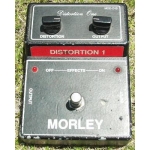
Picture from Effects database.
Here's a collection of vero (stripboard) and tagboard guitar and bass effect layouts that we have put together covering many classic and popular effects in growing numbers. Many of these have been posted on freestompboxes.org, so check that site out for great discussions on building your own effect pedals. Enjoy the builds and please also visit us on Facebook and Twitter
Showing posts with label Morley. Show all posts
Tuesday, 6 August 2013
Morley MOD-D1B Distortion One
This one seems to be quite rare thing. You can score one for >$200 at ebay. It is Morley's vision of the MXR Dist+/DOD OD250, with some noticeable changes. Might be worth a build...
Picture from Effects database.
Tags:
Distortion,
Morley,
Overdrive,
Verified,
Vero
Thursday, 3 January 2013
Morley DDB Diamond Distortion Box
While the circuit offers nothing completely new, i still think this is pretty nice distortion pedal. Should fit in B-box without any worries. It has a bypass buffer in it, so you'll need just a 2PDT stomp switch to get LED indication - If you don't want the LED, then omit the LED resistor from the board and use SPDT stomper.
From the manual:
The Diamond Distortion has three controls: DRIVE, TONE & LEVEL. Understanding these controls will help you to get the sound you are looking for. The DRIVE control determines the amount of distortion by driving up the input signal. See diagrams in the sample settings section of this manual. Keep in mind that your overall sound is a product of your guitar, amp, pickups, effects, cables, strings and of course - playing style. The TONE control allows you to adjust the tone of your sound from a subtle bass frequency to a biting treble sound. Again, refer to the sample setting section of this
manual for hints. The LEVEL control adjusts your overall output level when in distortion mode. Adjust this control to equal the level of the distortion to the bypassed signal OR turn it up past halfway to get a boost when you engage the distortion.
From the manual:
The Diamond Distortion has three controls: DRIVE, TONE & LEVEL. Understanding these controls will help you to get the sound you are looking for. The DRIVE control determines the amount of distortion by driving up the input signal. See diagrams in the sample settings section of this manual. Keep in mind that your overall sound is a product of your guitar, amp, pickups, effects, cables, strings and of course - playing style. The TONE control allows you to adjust the tone of your sound from a subtle bass frequency to a biting treble sound. Again, refer to the sample setting section of this
manual for hints. The LEVEL control adjusts your overall output level when in distortion mode. Adjust this control to equal the level of the distortion to the bypassed signal OR turn it up past halfway to get a boost when you engage the distortion.
Tags:
Distortion,
Morley,
Verified,
Vero
Subscribe to:
Posts (Atom)